产品系列:Smart-UPS、Smart-UPS Online
环境:所有型号以 SU、SUA、SUM、SURT 开头的 Smart-UPS 型号,所有序列号
原因:在线运行时,剩余运行时间(由 Smart-UPS 微处理器计算)必须至少比低电量信号警告时间多两分钟。如果 UPS 计算出的剩余运行时间比低电量信号时间少不到两分钟,则电池充电指示灯将闪烁。
解决方法:
选项 1:将低电量信号时间重置为较小的值。例如,假设一台 Smart-UPS 充满电后可运行 15 分钟,低电量警告时间设置为 7 分钟。如果剩余运行时间少于 8 分钟,电池电量指示条上的 LED 指示灯将同时闪烁。您可以尝试通过 PowerChute Plus 的“配置”菜单,然后在“UPS 关机参数”子菜单中将低电量警告时间设置为更短的值。最低设置选项为 2 分钟。请注意,在使用 PowerChute Business Edition 服务器和控制台时,低电量警告时间默认设置为 5 分钟,且无法更改。
选项 2:降低负载或更换电池。Smart-UPS 内部的固件设计寿命可达数年,但电池属于消耗品。随着电池老化,其蓄电能力会逐渐下降,因此可用运行时间也会随之减少。当剩余运行时间距离低电量信号警告时间不足 2 分钟时,电池充电 LED 将开始闪烁,PowerChute 软件/SmartSlot 配件将报告“UPS 电池已放电”,即使电池容量为 100%。 如果老款 UPS 运行负载过重,请尝试降低负载。如果是 XL(长效运行)型号,请尝试添加额外的电池组。电池寿命通常为 3-6 年。如果您使用的是老款 UPS,请尝试更换电池。XL 电池组和替换电池盒可在我们的网站购买。
选项 3:执行手动运行时间校准。这是一个手动操作,请勿与通过 PowerChute 软件执行的运行时间校准混淆。Smart-UPS 内部的电池由 UPS 内部的微处理器控制。有时需要重置此微处理器,尤其是在安装新电池之后。
注意:开始校准之前,请确保 UPS 已在线充电至少 24 小时(仅 UPS 本身)或 48 小时(带外接电池的 UPS)。停止 PowerChute 软件运行并断开串口线。在此过程中,UPS 必须至少连接 30% 的负载,且负载波动不得超过 +/- 5%。此过程会导致 UPS 关闭并切断电源插座的供电,因此,请先连接一个非关键负载给 UPS,然后断开 UPS 与市电的连接,强制其使用电池供电。让 UPS 使用电池供电运行直至完全关闭。务必确保负载达到 30% 或更高!将APCUPS电源重新插入墙壁插座并使其充电(如果关闭且无负载,充电速度会更快)。设备充电完成后,“剩余运行时间”的计算结果应该会更加准确。请注意,如果设备是较旧的型号,则运行时间不会有显著改善。注意:如果上述步骤未能解决问题,请联系 APC 客户支持以获得进一步帮助。
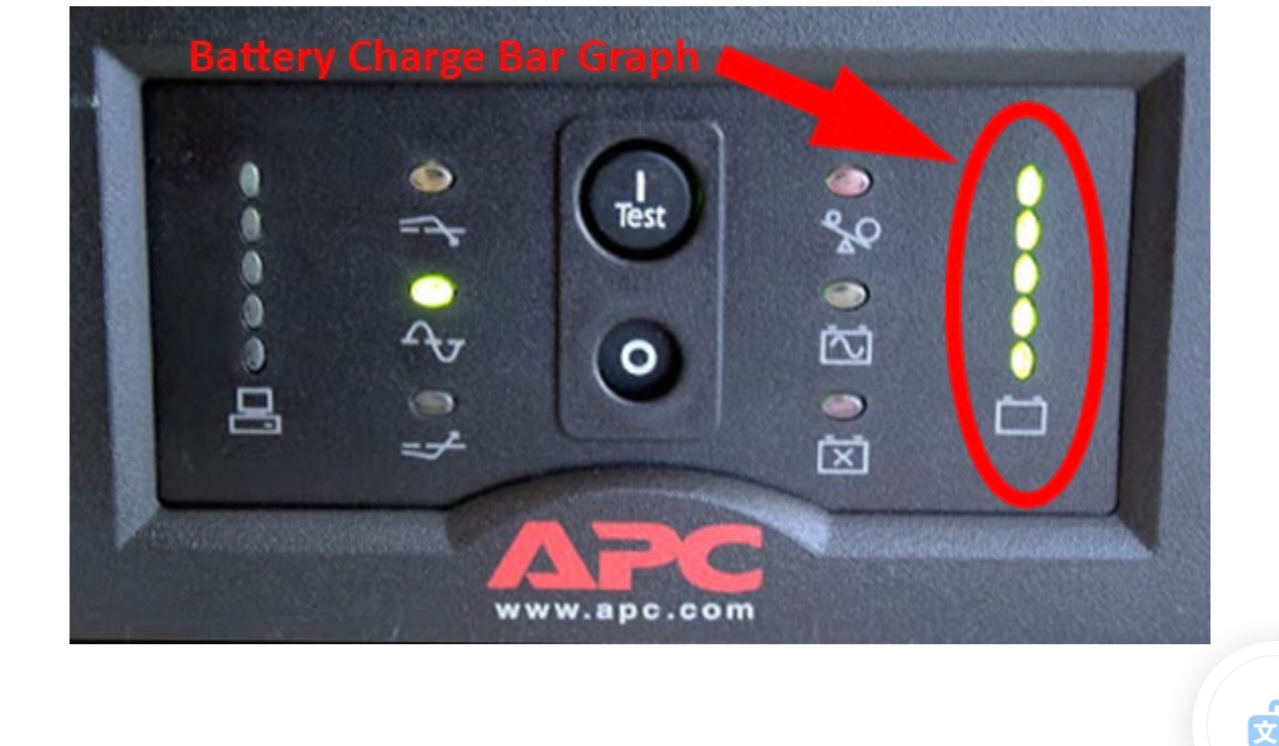
工作原理:APC Smart-UPS 内置微处理器,主要根据 UPS 的负载和电池容量计算运行时间。前面板右侧有一排五个 LED 指示灯,呈垂直排列。每个 LED 指示灯分别代表电池电量,以大约 20% 为增量:20%、40%、60%、80%、100%(从下到上)。
例如,如果电池电量为 95%,则五个 LED 指示灯中只有四个亮起。为了确保在使用 PowerChute Plus 或 SmartSlot 配件时操作系统能够正常关机,Smart-UPS 会在 UPS 电量不足时发出警报。警报以声音(快速蜂鸣声)、视觉(电池指示灯闪烁)和通过 PowerChute 软件图形界面(或特定操作系统内置的 UPS 关机程序)读取的方式发出。为了计算“低电量状态”,所有 Smart-UPS 产品默认的低电量信号警告时间为两分钟或两分半钟。如果负载需要更多时间才能正常关机,用户可以(通过 PowerChute 或网络管理卡)提高此阈值。如果低电量信号警告时间设置为 2 分钟,则警报将在关机前两分钟激活。同样,如果特定 UPS 的总运行时间为 30 分钟,低电量信号警告时间设置为 10 分钟,则APCUPS电源将在电池供电下运行 20 分钟后才会发出低电量警报。总运行时间主要取决于两个因素:电池容量和 UPS 负载。UPS 负载和电池供电运行时间成反比:负载增加,电池供电运行时间减少,反之亦然。当市电断电时,UPS 开始释放电池电量以维持所连接的负载。 恢复供电后,智能UPS将自动开始为其电池充电
Why are the battery charge LEDs flashing on a Smart-UPS?
Article available in these languages:
Czech, Espagnol, Français
Issue:
Battery Charge LED Bar Graph is flashing in unison.
Product line:
Smart-UPS, Smart-UPS Online
Environment:
All Smart-UPS models with model numbers that begin with SU, SUA, SUM, SURT
All serial numbers
Cause:
When operating on line, the runtime remaining (calculated by the Smart-UPS microprocessor) must be AT LEAST two minutes more than the low battery signal warning time.
If the UPS calculates the runtime remaining as being less than 2 minutes more than the low battery signal time, the battery charge graph LEDs will flash
Resolution:
Option 1: Reset the low battery signal time to a lesser value. Take for example, a Smart-UPS with 15 minutes of runtime at full charge, and with the low battery signal warning time set for 7 minutes. If the runtime remaining is 8 minutes or less , then the battery bar graph LEDs will flash in unison. Try setting the low battery signal warning time to a lesser value through the Configuration menu and then the UPS Shutdown Parameters submenu of PowerChute Plus. Two minutes is the lowest setting option available. Please keep in mind that when using PowerChute Business Edition server and console, the low battery signal time is set to 5 minutes and cannot be changed.
Option 2: Reduce the load or replace the battery. The firmware inside a Smart-UPS is designed to last for years, yet the batteries are consumable items. As the batteries age, they lose their ability to hold a charge and therefore, available runtime will decrease over time. Once the runtime remaining is within 2 minutes of the low battery signal warning time, the battery charge LEDs will begin to flash, and PowerChute software / SmartSlot accessories will report that the "UPS battery are discharged", even if the battery is at 100% capacity. In the case of an older unit running with a heavy load, try reducing the attached load. If the unit is an XL (Extended Run) model, then try adding an additional battery pack. Typical battery life is 3 - 6 years. If you have an older UPS, try replacing the battery. XL battery packs and replacement battery cartridges are available for purchase on our website atOption 3: Perform a Manual Runtime Calibration. This is a manual procedure and should not be confused with the runtime calibration performed through PowerChute software. The batteries inside of the Smart-UPS are controlled by a microprocessor within the UPS. Sometimes it is necessary to reset this microprocessor, especially after the installation of new batteries.
Note: Before beginning the calibration, make sure the UPS has been online and charging for at least 24 hours for just the UPS or 48 hours for a UPS with external batteries.
Stop the PowerChute software from running and disconnect the serial cable.
There must be at least a 30% load attached to the UPS during this procedure, and this load cannot fluctuate more than +/- 5%. This process will cause the UPS to shut off and cut power to its power outlets, therefore, attach a non-critical load to the UPS and then force the UPS on battery by disconnecting it from utility power.
Allow the unit to run on battery until it turns off completely. Make sure a 30% load or greater is present!
Plug the UPS back into the wall outlet and allow it to recharge (it will recharge more quickly if turned off and with no load present). Once the unit has recharged, the "runtime remaining" calculation should be more accurate. Remember that if the unit is an older model, then the runtime will not improve significantly.
Note: Should the previous steps not resolve the issue please contact APC Customer Support for further assistance.
Theory of Operation:
An APC Smart-UPS has a microprocessor that calculates runtime primarily based on the load attached to the UPS and on its battery capacity.
On the right side of the front display panel, there is a vertical graph of five LEDs. Each LED is an indication of battery charge in increments of (approximately) twenty percent: 20, 40, 60, 80, 100% (bottom to top). For example, if the battery charge is 95%, then only four of the five LEDs are illuminated.
To ensure that an operating system receives a graceful shutdown when using PowerChute plus or a SmartSlot accessory, an alert is generated by the Smart-UPS indicating that the UPS has reached a low battery condition. The alert is audible (rapid beeping), visual (flashing battery LED or LEDs), and readable through the graphical interface of PowerChute software (or a native UPS shutdown program within a particular operating system.)
In order to calculate this "low battery condition," all Smart-UPS products have a default low battery signal warning time of two or two and a half minutes. Users may adjust this threshold (Via Powerchute or a Network management Card) higher if their load needs more time to shut down gracefully. If the low battery signal warning time is set for 2 minutes, then the alerts will activate two minutes prior to shutdown.
Similarly, if the total runtime for a particular UPS is 30 minutes with a low battery signal warning time set at 10 minutes, then the UPS will run on battery for 20 minutes before the low battery alert begins. Total runtime is primarily based on two factors, battery capacity and UPS load. UPS load and runtime on battery are inversely proportional: as load increases, battery runtime decreases and vice versa. When utility power is lost, the UPS begins discharging the battery in order to support the attached load. Once power returns, the Smart-UPS will automatically begin to recharge its battery.
Publié pour: Schneider Electric Belgium


 当前位置:
 更新时间:2026-11-26
 点击次数:


 荣誉资质


